SOL Cambodia4.2.5 - App Store
You'll be able to see results in few seconds.
Publisher Description
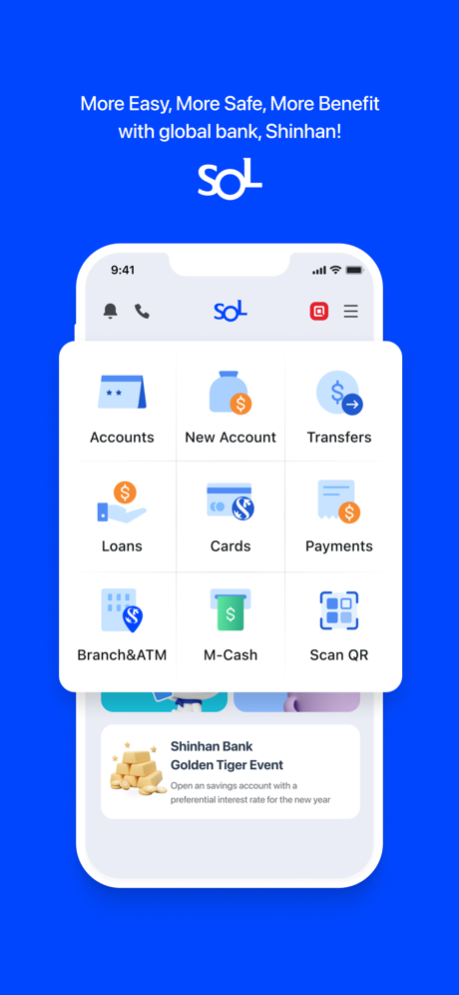
If you use Mobile SOL, you can enjoy Shinhan Bank Cambodia's financial services.
1. Convenient service
- Easy payment with KHQR service and easy account number sharing with Shinhan QR.
- Provides various login methods (password, fingerprint, FaceID).
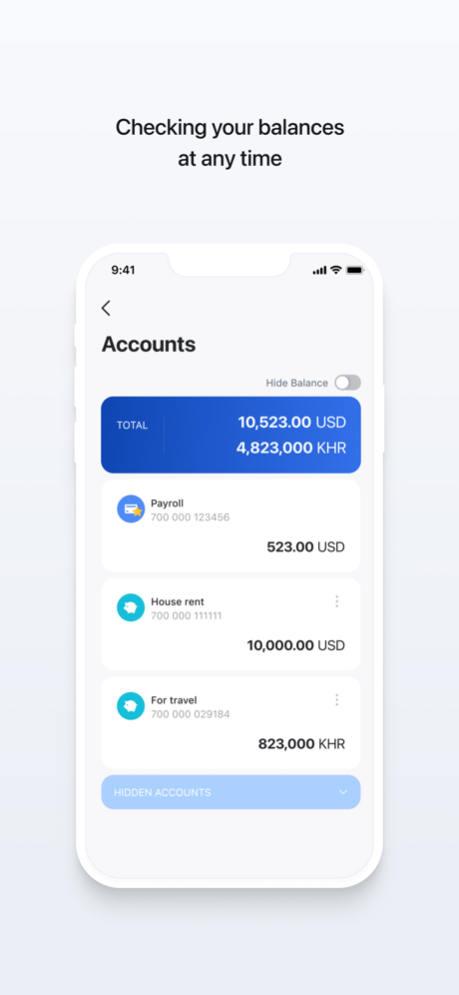
- You can check your account balance and transaction history at any time.
- Sign up for online term deposit/installment savings at a higher interest rate than branch offices.
- You can immediately transfer money to other local banks through Shinhan account transfer, Bakong, and RFT services.
- Solve the payment of utility bills (mobile, Internet, TV, utilities).
- With the M-Cash service, you can easily withdraw money from Shinhan Bank ATMs.
- If you use quick transfer/quick payment, you can transfer/pay quickly and conveniently.
- Issue a virtual card and use it right away without visiting the bank.
- Receive instant notification of deposit and withdrawal transactions through the Push service.
- Receive promotions and important information.
2. Benefits of using Mobile SOL:
- Most bank transaction fee waiver promotions
- Provides cashback benefits when charging mobile phones and paying utility bills
3. Digital Savings Account (24/7) with Mobile SOL:
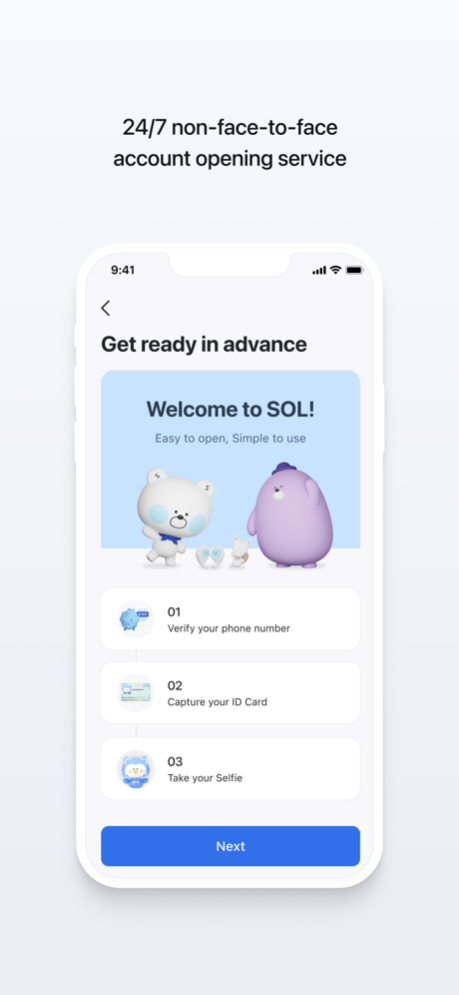
- You can open an account directly using SOL without visiting a branch.
- For more information on digital deposit accounts, please refer to the link below.
https://www.shinhan.com.kh/en/product/digital-saving-account.html
- If you are curious about how to open a digital deposit, please watch the link below (tutorial video).
https://www.youtube.com/watch?v=0txulJ_HuJM
Experience the new Shinhan Mobile SOL now.
(Call Center: +855 95 777 665 / 98 222 595 )
Version History * Security enhancements for a smoother user experience
* Minor bug fixes and other improvements 4.2.5 Sep 10 - UX/UI enhancements for a smoother experience
- Technical Improvements, Bug Fixes, and Performance Improvements 4.2.4 Aug 7 Shinhan QR Widget
Customers can now access their Shinhan QR directly from the home screen.
- Display QR code without opening the SOL Cambodia application
- Quick access for receiving payments
- Support easier QR sharing and payment convenience
- View updated exchange rate information directly on their Home Screen 4.2.3 Jul 6 - Improved SDK for more stable and secure QR payments
- Enhancements for better performance and stability 4.2.2 May 13 - Improved SDK for more stable and secure QR payments
- Enhancements for better performance and stability 4.2.1 Apr 21 - Technical improvement
- Bug fixes and performance improvements 4.2.0 Apr 7 - Update My QR Feature
- Upgrade SWIFT ISO20022
- Randomized Keypad to Fixed Layout
- Improve Scrolling Behavior 4.1.9 11/13/2025 - Updated MyQR feature
- Add Chinese language
- Minor bug fixes and other improvements 4.1.8 07/03/2025 - Improved ability to quick transfer
- Add agreement checkbox to product features/terms and conditions procedure when opening a deposit account
- Other UI improvements 4.1.7 04/21/2025 - My Mechant Feature Updates
- Minor bug fixes and other improvements 4.1.6 01/21/2025 - Minor bug fixes and other improvements 4.1.5 01/09/2025 - Improved some features 4.1.4 10/30/2024 - Add Single Currency feature
- Improved some features 4.1.3 10/28/2024 - Add L192 Payment Feature
- Add Quick Action Menu Feature
- Fixed some bugs 4.1.2 08/21/2024 - Some bug fixed and performance improvement 4.1.1 07/17/2024 - EKYC Process Improvement
- Change Icon
- Some bug fixed and performance improvement 4.1.0 07/02/2024 Add Passbook Feature.
Enhanced overall convenience features.
Fixed some bugs. 4.0.9 02/01/2024 Enhanced overall convenience features
Fixed some bugs. 4.0.8 12/15/2023 Add PPWSA barcode scan function 4.0.7 11/29/2023 Add My Merchant Feature
Fixed some error and bugs 4.0.6 11/20/2023 Enhanced overall convenience features.
Fixed some bugs. 4.0.5 09/08/2023 Add Cross-Currency Transfer Function to other banks.
Fixed some bugs. 4.0.4 08/16/2023 Security System Enhancements
Bug fixes & improvements 4.0.3 07/13/2023 - Home Screen pop up design added
- Modify the MOTP authentication non-login method during internet banking
- Fixed a bug that recognized as a new device when logging in to FIDO
- After charging the e-wallet with TADA Deep Link, return to the TADA app 4.0.2 05/26/2023 - EKYC is launched.
- Several bugs have been fixed. 4.0.1 05/03/2023
About SOL Cambodia
The company that develops SOL Cambodia is SHINHAN BANK CO. LTD. The latest version released by its developer is 4.2.5.
To install SOL Cambodia on your iOS device, just click the green Continue To App button above to start the installation process. The app is listed on our website since 2026-10-14 and was downloaded 0 times. We have already checked if the download link is safe, however for your own protection we recommend that you scan the downloaded app with your antivirus. Your antivirus may detect the SOL Cambodia as malware if the download link is broken.
How to install SOL Cambodia on your iOS device:
- Click on the Continue To App button on our website. This will redirect you to the App Store.
- Once the SOL Cambodia is shown in the iTunes listing of your iOS device, you can start its download and installation. Tap on the GET button to the right of the app to start downloading it.
- If you are not logged-in the iOS appstore app, you'll be prompted for your your Apple ID and/or password.
- After SOL Cambodia is downloaded, you'll see an INSTALL button to the right. Tap on it to start the actual installation of the iOS app.
- Once installation is finished you can tap on the OPEN button to start it. Its icon will also be added to your device home screen.
Program Details
System requirements
Download information
Pricing
Version History
version 4.2.5
posted on 2026-10-14
Version History * Security enhancements for a smoother user experience
* Minor bug fixes and other improvements 4.2.5 Sep 10 - UX/UI enhancements for a smoother experience
- Technical Improvements, Bug Fixes, and Performance Improvements 4.2.4 Aug 7 Shinhan QR Widget
Customers can now access their Shinhan QR directly from the home screen.
- Display QR code without opening the SOL Cambodia application
- Quick access for receiving payments
- Support easier QR sharing and payment convenience
- View updated exchange rate information directly on their Home Screen 4.2.3 Jul 6 - Improved SDK for more stable and secure QR payments
- Enhancements for better performance and stability 4.2.2 May 13 - Improved SDK for more stable and secure QR payments
- Enhancements for better performance and stability 4.2.1 Apr 21 - Technical improvement
- Bug fixes and performance improvements 4.2.0 Apr 7 - Update My QR Feature
- Upgrade SWIFT ISO20022
- Randomized Keypad to Fixed Layout
- Improve Scrolling Behavior 4.1.9 11/13/2025 - Updated MyQR feature
- Add Chinese language
- Minor bug fixes and other improvements 4.1.8 07/03/2025 - Improved ability to quick transfer
- Add agreement checkbox to product features/terms and conditions procedure when opening a deposit account
- Other UI improvements 4.1.7 04/21/2025 - My Mechant Feature Updates
- Minor bug fixes and other improvements 4.1.6 01/21/2025 - Minor bug fixes and other improvements 4.1.5 01/09/2025 - Improved some features 4.1.4 10/30/2024 - Add Single Currency feature
- Improved some features 4.1.3 10/28/2024 - Add L192 Payment Feature
- Add Quick Action Menu Feature
- Fixed some bugs 4.1.2 08/21/2024 - Some bug fixed and performance improvement 4.1.1 07/17/2024 - EKYC Process Improvement
- Change Icon
- Some bug fixed and performance improvement 4.1.0 07/02/2024 Add Passbook Feature.
Enhanced overall convenience features.
Fixed some bugs. 4.0.9 02/01/2024 Enhanced overall convenience features
Fixed some bugs. 4.0.8 12/15/2023 Add PPWSA barcode scan function 4.0.7 11/29/2023 Add My Merchant Feature
Fixed some error and bugs 4.0.6 11/20/2023 Enhanced overall convenience features.
Fixed some bugs. 4.0.5 09/08/2023 Add Cross-Currency Transfer Function to other banks.
Fixed some bugs. 4.0.4 08/16/2023 Security System Enhancements
Bug fixes & improvements 4.0.3 07/13/2023 - Home Screen pop up design added
- Modify the MOTP authentication non-login method during internet banking
- Fixed a bug that recognized as a new device when logging in to FIDO
- After charging the e-wallet with TADA Deep Link, return to the TADA app 4.0.2 05/26/2023 - EKYC is launched.
- Several bugs have been fixed. 4.0.1 05/03/2023
version 4.2.5
posted on 2026-09-13
Version History * Security enhancements for a smoother user experience
* Minor bug fixes and other improvements 4.2.5 3d ago - UX/UI enhancements for a smoother experience
- Technical Improvements, Bug Fixes, and Performance Improvements 4.2.4 Aug 7 Shinhan QR Widget
Customers can now access their Shinhan QR directly from the home screen.
- Display QR code without opening the SOL Cambodia application
- Quick access for receiving payments
- Support easier QR sharing and payment convenience
- View updated exchange rate information directly on their Home Screen 4.2.3 Jul 6 - Improved SDK for more stable and secure QR payments
- Enhancements for better performance and stability 4.2.2 May 13 - Improved SDK for more stable and secure QR payments
- Enhancements for better performance and stability 4.2.1 Apr 21 - Technical improvement
- Bug fixes and performance improvements 4.2.0 Apr 7 - Update My QR Feature
- Upgrade SWIFT ISO20022
- Randomized Keypad to Fixed Layout
- Improve Scrolling Behavior 4.1.9 11/13/2025 - Updated MyQR feature
- Add Chinese language
- Minor bug fixes and other improvements 4.1.8 07/03/2025 - Improved ability to quick transfer
- Add agreement checkbox to product features/terms and conditions procedure when opening a deposit account
- Other UI improvements 4.1.7 04/21/2025 - My Mechant Feature Updates
- Minor bug fixes and other improvements 4.1.6 01/21/2025 - Minor bug fixes and other improvements 4.1.5 01/09/2025 - Improved some features 4.1.4 10/30/2024 - Add Single Currency feature
- Improved some features 4.1.3 10/28/2024 - Add L192 Payment Feature
- Add Quick Action Menu Feature
- Fixed some bugs 4.1.2 08/21/2024 - Some bug fixed and performance improvement 4.1.1 07/17/2024 - EKYC Process Improvement
- Change Icon
- Some bug fixed and performance improvement 4.1.0 07/02/2024 Add Passbook Feature.
Enhanced overall convenience features.
Fixed some bugs. 4.0.9 02/01/2024 Enhanced overall convenience features
Fixed some bugs. 4.0.8 12/15/2023 Add PPWSA barcode scan function 4.0.7 11/29/2023 Add My Merchant Feature
Fixed some error and bugs 4.0.6 11/20/2023 Enhanced overall convenience features.
Fixed some bugs. 4.0.5 09/08/2023 Add Cross-Currency Transfer Function to other banks.
Fixed some bugs. 4.0.4 08/16/2023 Security System Enhancements
Bug fixes & improvements 4.0.3 07/13/2023 - Home Screen pop up design added
- Modify the MOTP authentication non-login method during internet banking
- Fixed a bug that recognized as a new device when logging in to FIDO
- After charging the e-wallet with TADA Deep Link, return to the TADA app 4.0.2 05/26/2023 - EKYC is launched.
- Several bugs have been fixed. 4.0.1 05/03/2023
version 4.2.4
posted on 2026-09-06
Version History - UX/UI enhancements for a smoother experience
- Technical Improvements, Bug Fixes, and Performance Improvements 4.2.4 Aug 7 Shinhan QR Widget
Customers can now access their Shinhan QR directly from the home screen.
- Display QR code without opening the SOL Cambodia application
- Quick access for receiving payments
- Support easier QR sharing and payment convenience
- View updated exchange rate information directly on their Home Screen 4.2.3 Jul 6 - Improved SDK for more stable and secure QR payments
- Enhancements for better performance and stability 4.2.2 May 13 - Improved SDK for more stable and secure QR payments
- Enhancements for better performance and stability 4.2.1 Apr 21 - Technical improvement
- Bug fixes and performance improvements 4.2.0 Apr 7 - Update My QR Feature
- Upgrade SWIFT ISO20022
- Randomized Keypad to Fixed Layout
- Improve Scrolling Behavior 4.1.9 11/13/2025 - Updated MyQR feature
- Add Chinese language
- Minor bug fixes and other improvements 4.1.8 07/03/2025 - Improved ability to quick transfer
- Add agreement checkbox to product features/terms and conditions procedure when opening a deposit account
- Other UI improvements 4.1.7 04/21/2025 - My Mechant Feature Updates
- Minor bug fixes and other improvements 4.1.6 01/21/2025 - Minor bug fixes and other improvements 4.1.5 01/09/2025 - Improved some features 4.1.4 10/30/2024 - Add Single Currency feature
- Improved some features 4.1.3 10/28/2024 - Add L192 Payment Feature
- Add Quick Action Menu Feature
- Fixed some bugs 4.1.2 08/21/2024 - Some bug fixed and performance improvement 4.1.1 07/17/2024 - EKYC Process Improvement
- Change Icon
- Some bug fixed and performance improvement 4.1.0 07/02/2024 Add Passbook Feature.
Enhanced overall convenience features.
Fixed some bugs. 4.0.9 02/01/2024 Enhanced overall convenience features
Fixed some bugs. 4.0.8 12/15/2023 Add PPWSA barcode scan function 4.0.7 11/29/2023 Add My Merchant Feature
Fixed some error and bugs 4.0.6 11/20/2023 Enhanced overall convenience features.
Fixed some bugs. 4.0.5 09/08/2023 Add Cross-Currency Transfer Function to other banks.
Fixed some bugs. 4.0.4 08/16/2023 Security System Enhancements
Bug fixes & improvements 4.0.3 07/13/2023 - Home Screen pop up design added
- Modify the MOTP authentication non-login method during internet banking
- Fixed a bug that recognized as a new device when logging in to FIDO
- After charging the e-wallet with TADA Deep Link, return to the TADA app 4.0.2 05/26/2023 - EKYC is launched.
- Several bugs have been fixed. 4.0.1 05/03/2023 • Provides a simple login method
• Easy and convenient service with a bright and simple screen composition
• Provides various remittance services, e-wallet charging, and utility bill payment services
• 24/7 non-face-to-face account opening service 4.0.0 05/02/2023
version 4.2.4
posted on 2026-08-11
Version History - UX/UI enhancements for a smoother experience
- Technical Improvements, Bug Fixes, and Performance Improvements 4.2.4 4d ago Shinhan QR Widget
Customers can now access their Shinhan QR directly from the home screen.
- Display QR code without opening the SOL Cambodia application
- Quick access for receiving payments
- Support easier QR sharing and payment convenience
- View updated exchange rate information directly on their Home Screen 4.2.3 Jul 6 - Improved SDK for more stable and secure QR payments
- Enhancements for better performance and stability 4.2.2 May 13 - Improved SDK for more stable and secure QR payments
- Enhancements for better performance and stability 4.2.1 Apr 21 - Technical improvement
- Bug fixes and performance improvements 4.2.0 Apr 7 - Update My QR Feature
- Upgrade SWIFT ISO20022
- Randomized Keypad to Fixed Layout
- Improve Scrolling Behavior 4.1.9 11/13/2025 - Updated MyQR feature
- Add Chinese language
- Minor bug fixes and other improvements 4.1.8 07/03/2025 - Improved ability to quick transfer
- Add agreement checkbox to product features/terms and conditions procedure when opening a deposit account
- Other UI improvements 4.1.7 04/21/2025 - My Mechant Feature Updates
- Minor bug fixes and other improvements 4.1.6 01/21/2025 - Minor bug fixes and other improvements 4.1.5 01/09/2025 - Improved some features 4.1.4 10/30/2024 - Add Single Currency feature
- Improved some features 4.1.3 10/28/2024 - Add L192 Payment Feature
- Add Quick Action Menu Feature
- Fixed some bugs 4.1.2 08/21/2024 - Some bug fixed and performance improvement 4.1.1 07/17/2024 - EKYC Process Improvement
- Change Icon
- Some bug fixed and performance improvement 4.1.0 07/02/2024 Add Passbook Feature.
Enhanced overall convenience features.
Fixed some bugs. 4.0.9 02/01/2024 Enhanced overall convenience features
Fixed some bugs. 4.0.8 12/15/2023 Add PPWSA barcode scan function 4.0.7 11/29/2023 Add My Merchant Feature
Fixed some error and bugs 4.0.6 11/20/2023 Enhanced overall convenience features.
Fixed some bugs. 4.0.5 09/08/2023 Add Cross-Currency Transfer Function to other banks.
Fixed some bugs. 4.0.4 08/16/2023 Security System Enhancements
Bug fixes & improvements 4.0.3 07/13/2023 - Home Screen pop up design added
- Modify the MOTP authentication non-login method during internet banking
- Fixed a bug that recognized as a new device when logging in to FIDO
- After charging the e-wallet with TADA Deep Link, return to the TADA app 4.0.2 05/26/2023 - EKYC is launched.
- Several bugs have been fixed. 4.0.1 05/03/2023 • Provides a simple login method
• Easy and convenient service with a bright and simple screen composition
• Provides various remittance services, e-wallet charging, and utility bill payment services
• 24/7 non-face-to-face account opening service 4.0.0 05/02/2023
version 4.2.3
posted on 2026-07-23
Version History Shinhan QR Widget
Customers can now access their Shinhan QR directly from the home screen.
- Display QR code without opening the SOL Cambodia application
- Quick access for receiving payments
- Support easier QR sharing and payment convenience
- View updated exchange rate information directly on their Home Screen 4.2.3 Jul 6 - Improved SDK for more stable and secure QR payments
- Enhancements for better performance and stability 4.2.2 May 13 - Improved SDK for more stable and secure QR payments
- Enhancements for better performance and stability 4.2.1 Apr 21 - Technical improvement
- Bug fixes and performance improvements 4.2.0 Apr 7 - Update My QR Feature
- Upgrade SWIFT ISO20022
- Randomized Keypad to Fixed Layout
- Improve Scrolling Behavior 4.1.9 11/13/2025 - Updated MyQR feature
- Add Chinese language
- Minor bug fixes and other improvements 4.1.8 07/03/2025 - Improved ability to quick transfer
- Add agreement checkbox to product features/terms and conditions procedure when opening a deposit account
- Other UI improvements 4.1.7 04/21/2025 - My Mechant Feature Updates
- Minor bug fixes and other improvements 4.1.6 01/21/2025 - Minor bug fixes and other improvements 4.1.5 01/09/2025 - Improved some features 4.1.4 10/30/2024 - Add Single Currency feature
- Improved some features 4.1.3 10/28/2024 - Add L192 Payment Feature
- Add Quick Action Menu Feature
- Fixed some bugs 4.1.2 08/21/2024 - Some bug fixed and performance improvement 4.1.1 07/17/2024 - EKYC Process Improvement
- Change Icon
- Some bug fixed and performance improvement 4.1.0 07/02/2024 Add Passbook Feature.
Enhanced overall convenience features.
Fixed some bugs. 4.0.9 02/01/2024 Enhanced overall convenience features
Fixed some bugs. 4.0.8 12/15/2023 Add PPWSA barcode scan function 4.0.7 11/29/2023 Add My Merchant Feature
Fixed some error and bugs 4.0.6 11/20/2023 Enhanced overall convenience features.
Fixed some bugs. 4.0.5 09/08/2023 Add Cross-Currency Transfer Function to other banks.
Fixed some bugs. 4.0.4 08/16/2023 Security System Enhancements
Bug fixes & improvements 4.0.3 07/13/2023 - Home Screen pop up design added
- Modify the MOTP authentication non-login method during internet banking
- Fixed a bug that recognized as a new device when logging in to FIDO
- After charging the e-wallet with TADA Deep Link, return to the TADA app 4.0.2 05/26/2023 - EKYC is launched.
- Several bugs have been fixed. 4.0.1 05/03/2023 • Provides a simple login method
• Easy and convenient service with a bright and simple screen composition
• Provides various remittance services, e-wallet charging, and utility bill payment services
• 24/7 non-face-to-face account opening service 4.0.0 05/02/2023 Add My Salary Account Product Feature
Add PPWM Service feature
Fixed some bugs. 3.1.7 03/30/2023
version 4.2.2
posted on 2026-07-01
Version History - Improved SDK for more stable and secure QR payments
- Enhancements for better performance and stability 4.2.2 May 13 - Improved SDK for more stable and secure QR payments
- Enhancements for better performance and stability 4.2.1 Apr 21 - Technical improvement
- Bug fixes and performance improvements 4.2.0 Apr 7 - Update My QR Feature
- Upgrade SWIFT ISO20022
- Randomized Keypad to Fixed Layout
- Improve Scrolling Behavior 4.1.9 11/13/2025 - Updated MyQR feature
- Add Chinese language
- Minor bug fixes and other improvements 4.1.8 07/03/2025 - Improved ability to quick transfer
- Add agreement checkbox to product features/terms and conditions procedure when opening a deposit account
- Other UI improvements 4.1.7 04/21/2025 - My Mechant Feature Updates
- Minor bug fixes and other improvements 4.1.6 01/21/2025 - Minor bug fixes and other improvements 4.1.5 01/09/2025 - Improved some features 4.1.4 10/30/2024 - Add Single Currency feature
- Improved some features 4.1.3 10/28/2024 - Add L192 Payment Feature
- Add Quick Action Menu Feature
- Fixed some bugs 4.1.2 08/21/2024 - Some bug fixed and performance improvement 4.1.1 07/17/2024 - EKYC Process Improvement
- Change Icon
- Some bug fixed and performance improvement 4.1.0 07/02/2024 Add Passbook Feature.
Enhanced overall convenience features.
Fixed some bugs. 4.0.9 02/01/2024 Enhanced overall convenience features
Fixed some bugs. 4.0.8 12/15/2023 Add PPWSA barcode scan function 4.0.7 11/29/2023 Add My Merchant Feature
Fixed some error and bugs 4.0.6 11/20/2023 Enhanced overall convenience features.
Fixed some bugs. 4.0.5 09/08/2023 Add Cross-Currency Transfer Function to other banks.
Fixed some bugs. 4.0.4 08/16/2023 Security System Enhancements
Bug fixes & improvements 4.0.3 07/13/2023 - Home Screen pop up design added
- Modify the MOTP authentication non-login method during internet banking
- Fixed a bug that recognized as a new device when logging in to FIDO
- After charging the e-wallet with TADA Deep Link, return to the TADA app 4.0.2 05/26/2023 - EKYC is launched.
- Several bugs have been fixed. 4.0.1 05/03/2023 • Provides a simple login method
• Easy and convenient service with a bright and simple screen composition
• Provides various remittance services, e-wallet charging, and utility bill payment services
• 24/7 non-face-to-face account opening service 4.0.0 05/02/2023 Add My Salary Account Product Feature
Add PPWM Service feature
Fixed some bugs. 3.1.7 03/30/2023 Add Scan QR Simple Log in feature.
Fixed some bugs. 3.1.6 12/22/2022
version 4.2.2
posted on 2026-05-17
Version History - Improved SDK for more stable and secure QR payments
- Enhancements for better performance and stability 4.2.2 3d ago - Improved SDK for more stable and secure QR payments
- Enhancements for better performance and stability 4.2.1 Apr 21 - Technical improvement
- Bug fixes and performance improvements 4.2.0 Apr 7 - Update My QR Feature
- Upgrade SWIFT ISO20022
- Randomized Keypad to Fixed Layout
- Improve Scrolling Behavior 4.1.9 11/13/2025 - Updated MyQR feature
- Add Chinese language
- Minor bug fixes and other improvements 4.1.8 07/03/2025 - Improved ability to quick transfer
- Add agreement checkbox to product features/terms and conditions procedure when opening a deposit account
- Other UI improvements 4.1.7 04/21/2025 - My Mechant Feature Updates
- Minor bug fixes and other improvements 4.1.6 01/21/2025 - Minor bug fixes and other improvements 4.1.5 01/09/2025 - Improved some features 4.1.4 10/30/2024 - Add Single Currency feature
- Improved some features 4.1.3 10/28/2024 - Add L192 Payment Feature
- Add Quick Action Menu Feature
- Fixed some bugs 4.1.2 08/21/2024 - Some bug fixed and performance improvement 4.1.1 07/17/2024 - EKYC Process Improvement
- Change Icon
- Some bug fixed and performance improvement 4.1.0 07/02/2024 Add Passbook Feature.
Enhanced overall convenience features.
Fixed some bugs. 4.0.9 02/01/2024 Enhanced overall convenience features
Fixed some bugs. 4.0.8 12/15/2023 Add PPWSA barcode scan function 4.0.7 11/29/2023 Add My Merchant Feature
Fixed some error and bugs 4.0.6 11/20/2023 Enhanced overall convenience features.
Fixed some bugs. 4.0.5 09/08/2023 Add Cross-Currency Transfer Function to other banks.
Fixed some bugs. 4.0.4 08/16/2023 Security System Enhancements
Bug fixes & improvements 4.0.3 07/13/2023 - Home Screen pop up design added
- Modify the MOTP authentication non-login method during internet banking
- Fixed a bug that recognized as a new device when logging in to FIDO
- After charging the e-wallet with TADA Deep Link, return to the TADA app 4.0.2 05/26/2023 - EKYC is launched.
- Several bugs have been fixed. 4.0.1 05/03/2023 • Provides a simple login method
• Easy and convenient service with a bright and simple screen composition
• Provides various remittance services, e-wallet charging, and utility bill payment services
• 24/7 non-face-to-face account opening service 4.0.0 05/02/2023 Add My Salary Account Product Feature
Add PPWM Service feature
Fixed some bugs. 3.1.7 03/30/2023 Add Scan QR Simple Log in feature.
Fixed some bugs. 3.1.6 12/22/2022
version 4.1.9
posted on 2025-11-13
- Update My QR Feature
- Upgrade SWIFT ISO20022
- Randomized Keypad to Fixed Layout
- Improve Scrolling Behavior
version 4.1.8
posted on 2025-07-03
Jul 3, 2025
Version 4.1.8
- Updated MyQR feature
- Add Chinese language
- Minor bug fixes and other improvements
version 4.1.7
posted on 2025-04-21
Apr 21, 2025
Version 4.1.7
- Improved ability to quick transfer
- Add agreement checkbox to product features/terms and conditions procedure when opening a deposit account
- Other UI improvements
Disclaimer
Official App Store Link
We do not host SOL Cambodia on our servers. We did not scan it for viruses, adware, spyware or other type of malware. This app is hosted by Apple and passed their terms and conditions to be listed there. We recommend caution when installing it.
The App Store link for SOL Cambodia is provided to you by apps112.com without any warranties, representations or guarantees of any kind, so access it at your own risk.
If you have questions regarding this particular app contact the publisher directly. For questions about the functionalities of apps112.com contact us.